# Sensor Mode 2 Circular Progress
A circular progress sensor (known as `fan` in the AOOSTAR-X software) masks a progress bar image for a certain angular
range based on the corresponding sensor value. The masked image is alpha-blended with the panel image.
Sensor configuration fields:
- `mode`: 2 (for fan)
- `direction`: 1 = clockwise, 2 = counter-clockwise
- `label`: label identifier, also used as sensor value data source identifier
- `x`, `y`: position on the panel
- `width`, `height`: size of the circular progress element (not yet used)
- `pic`: circular progress image to overlay. Should match `width`, `height`
- `minAngle`, `maxAngle`: range of the masked image
- `minValue`, `maxValue`: clamp sensor value to this range
- `xz_x`, `xz_y`
## Example
The following configuration and graphics are taken from the `仪表盘_windows` panel configuration in `有线网卡 windows驱动.rar`.
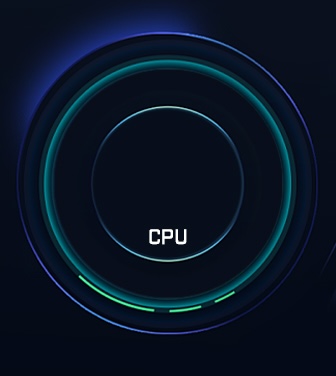
Example `panel.json` with a single "fan" indicator sensor and the following (partial) background image in `img`:
 ```json
{
"name": "Fan test panel",
"img": "background.jpg",
"sensor": [
{
"id": "29d9ef2d-30b4-459d-b2b0-43cb6d4d6b41",
"itemName": "CPU usage",
"mode": 2,
"direction": 1,
"label": "cpu_percent",
"value": "47.7",
"x": 168,
"y": 184,
"width": 237,
"height": 237,
"minAngle": -160,
"maxAngle": 30,
"minValue": 0,
"maxValue": 80,
"xz_x": 0,
"xz_y": 0,
"pic": "progress_circle.png"
}
]
}
```
Progress image `"pic": "progress_circle.png"`:

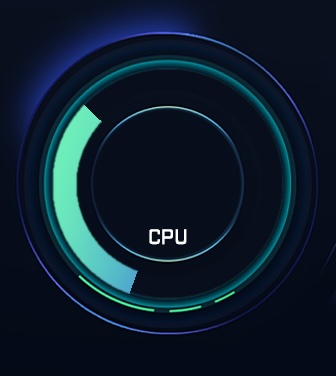
The following graphic is rendered for progress example above:
```json
{
"name": "Fan test panel",
"img": "background.jpg",
"sensor": [
{
"id": "29d9ef2d-30b4-459d-b2b0-43cb6d4d6b41",
"itemName": "CPU usage",
"mode": 2,
"direction": 1,
"label": "cpu_percent",
"value": "47.7",
"x": 168,
"y": 184,
"width": 237,
"height": 237,
"minAngle": -160,
"maxAngle": 30,
"minValue": 0,
"maxValue": 80,
"xz_x": 0,
"xz_y": 0,
"pic": "progress_circle.png"
}
]
}
```
Progress image `"pic": "progress_circle.png"`:

The following graphic is rendered for progress example above:
 ## Known Issues
Fan sensor rendering has been reverse engineered from the AOOSTAR-X app. Not all options are supported.
- Work in progress, not yet fully tested
- `direction: 2` doesn't seem to work
- `widht`, `height` should be considered and auto-resized as for mode 4
## Known Issues
Fan sensor rendering has been reverse engineered from the AOOSTAR-X app. Not all options are supported.
- Work in progress, not yet fully tested
- `direction: 2` doesn't seem to work
- `widht`, `height` should be considered and auto-resized as for mode 4